.dll 파일을 포함한 프로그램 빌드
이번 포스팅은 실시간 그래프 그리는 프로젝트의 실행 파일을 만들어보겠습니다.
[C#] ZedGragh 실시간 그래프 그리기
ZedGragh 패키지를 통해 실시간 그래프 그리기 using ZedGraph; 그래프 초기 설정을 합니다. private void Init() { // zedGraphControl1 : winform 에서 사용하는 zedGraphControl 이름 mypane = zedGraphControl1.GraphPane; // TItl
mssil-7.tistory.com
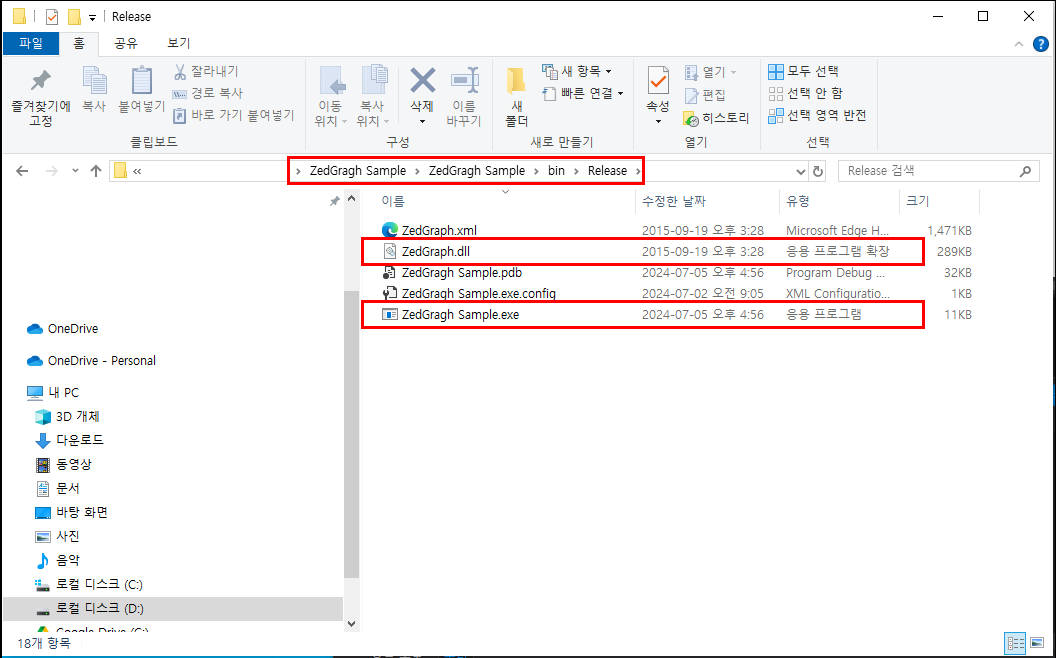
라이브러리를 사용한 프로젝트에서 아래와 같은 방법으로 실행파일을 만들 경우
프로젝트 폴더 > bin > Release 폴더에 실행파일이 만들어지고 별도의 dll 파일이 있습니다.
dll을 포함하지 않고 빌드를 할 경우 프로그램 실행파일을 배포할 때 dll 파일도 같이 배포해야 하기 때문에 사용자 입장에서 불편하다고 느낄 수 있습니다. 우리는 이러한 불편을 줄이기 위해 .dll 파일을 포함한 실행파일을 생성해보도록 하겠습니다.
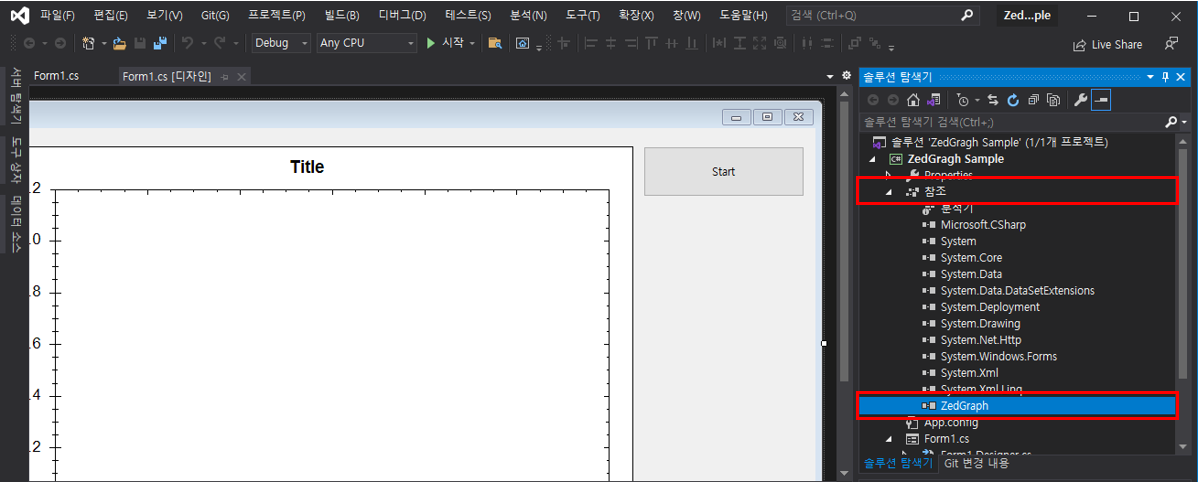
ZedGragh 프로젝트에 참조를 보면 ZedGragh 라이브러리를 추가해보도록 하겠습니다.
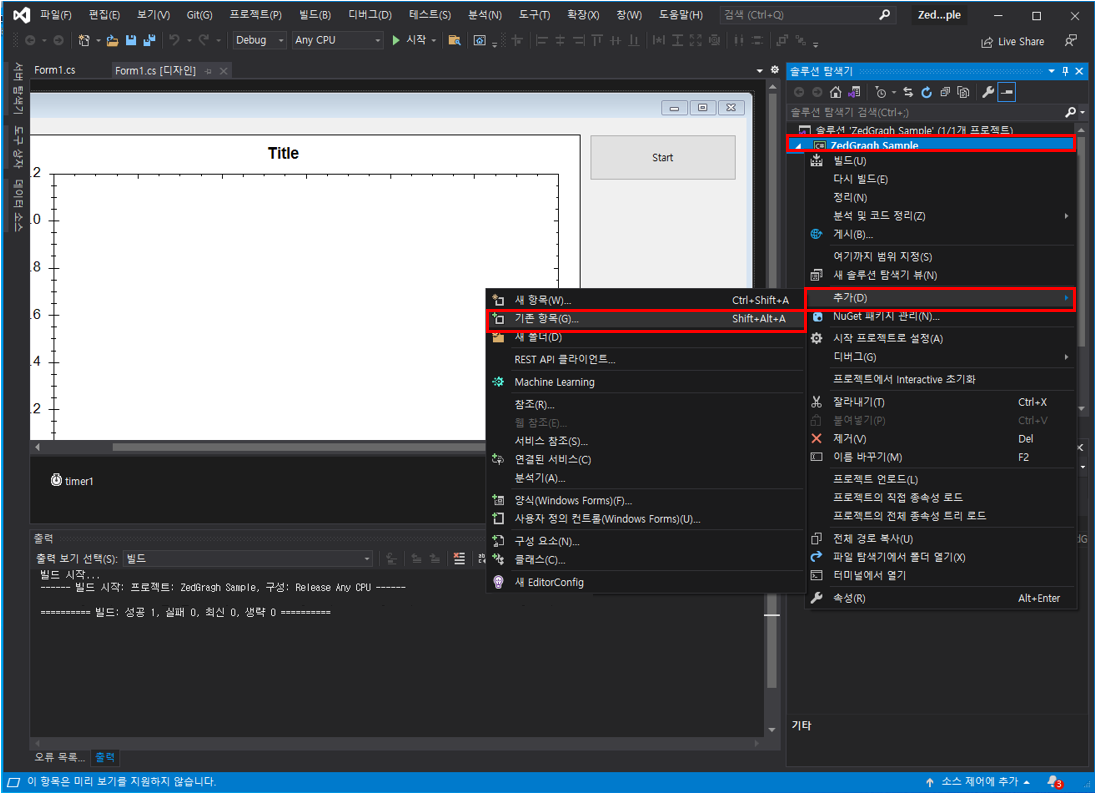
프로젝트 우클릭 > 추가 > 기존항목 을 클릭합니다.
프로젝트 폴더 > bin > Debug 폴더에 있는 ZedGragh.dll 파일을 찾아 추가합니다.

dll 파일이 추가된것을 확인할 수 있습니다. 이 파일을 클릭하여 속성 값을 변경합니다.
ZedGragh.dll 속성 > 빌드 작업 > 포함 리소스 선택

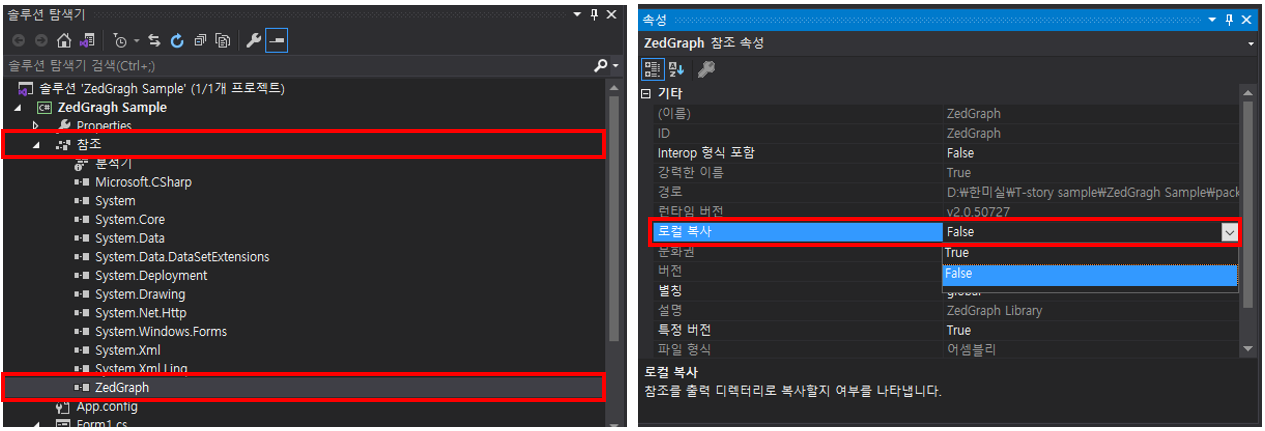
기존의 참조에 있던 ZedGragh 속성을 변경합니다.
ZedGragh 속성 > 로컬 복사 > False 선택
마지막으로 dll 파일들을 어셈블리하게 해주는 코드를 추가합니다.
using System.Reflection; static void Main()
{
AppDomain.CurrentDomain.AssemblyResolve += ResolveAssembly;
...
}
private static Assembly ResolveAssembly(object sender, ResolveEventArgs args)
{
var thisAssembly = Assembly.GetExecutingAssembly();
var name = args.Name.Substring(0, args.Name.IndexOf(',')) + ".dll";
var resources = thisAssembly.GetManifestResourceNames().Where(s => s.EndsWith(name));
var enumerable = resources.ToList();
if (!enumerable.Any()) return null;
var resourceName = enumerable.First();
var stream = thisAssembly.GetManifestResourceStream(resourceName);
if (stream == null) return null;
var assembly = new byte[stream.Length];
stream.Read(assembly, 0, assembly.Length);
return Assembly.Load(assembly);
}
나머지는 아래의 포스팅을 참고하여 빌드합니다.
[C#] 프로그램 빌드(.exe 파일 생성)
C# 프로그램 파일 빌드하는 방법 Visual Studio Code 왼쪽 상단에 있는 프로젝트 > 프로젝트 속성 클릭 속성창의 애플리케이션 탭에서 대상 프레임워크와 출력 형식을 설정합니다. 대상 프레임 워
mssil-7.tistory.com
dll 파일을 포함하여 빌드했기 때문에 .exe 파일만 생성되었습니다.

'프로그래밍 언어 > C#' 카테고리의 다른 글
| [C#] .ini 파일의 개념과 사용 방법 (0) | 2024.07.24 |
|---|---|
| [C#] TCP/IP 소켓 통신 (Server/Client) (0) | 2024.07.15 |
| [C#] 프로그램 빌드(.exe 파일 생성) (2) | 2024.07.05 |
| [C#] ZedGraph 실시간 그래프 그리기 (0) | 2024.07.02 |
| [C#] ZedGragh 패키지 설치하기(NuGet 패키지 설치, DLL 직접 참조) (0) | 2024.07.02 |


