ZedGraph 패키지를 통해 실시간 그래프 그리기
using ZedGraph;
그래프 초기 설정을 합니다.
    private void Init()
    {
        // zedGraphControl1 : winform 에서 사용하는 zedGraphControl 이름
        mypane = zedGraphControl1.GraphPane;
        // TItle 설정
        mypane.Title.Text = "EXAMPLE FOR ZEDGRAPH";
        mypane.Title.IsVisible = false;
        mypane.Title.FontSpec.Size = 15;
        mypane.Title.FontSpec.IsBold = true;

        //
        exampleLineItem = mypane.AddCurve("EXAMPLE", examplePointPairLitst, Color.Yellow, SymbolType.None);
        exampleLineItem.Line.Width = 2;
        exampleLineItem.Symbol.Fill = new Fill(Color.Black);

        // x축 설정
        mypane.XAxis.Type = AxisType.Linear;
        mypane.XAxis.Type = AxisType.Date;
        mypane.XAxis.Title.Text = "Time (HH:mm)";
        mypane.XAxis.Scale.Format = "mm:ss";
        mypane.XAxis.Scale.FontSpec.Size = 12;
        mypane.XAxis.Scale.MinorUnit = DateUnit.Second;
        mypane.XAxis.Scale.MinorStep = 1;


        mypane.Chart.Fill = new Fill(Color.LightGray);
        zedGraphControl1.AxisChange();
        zedGraphControl1.Invalidate();
    }
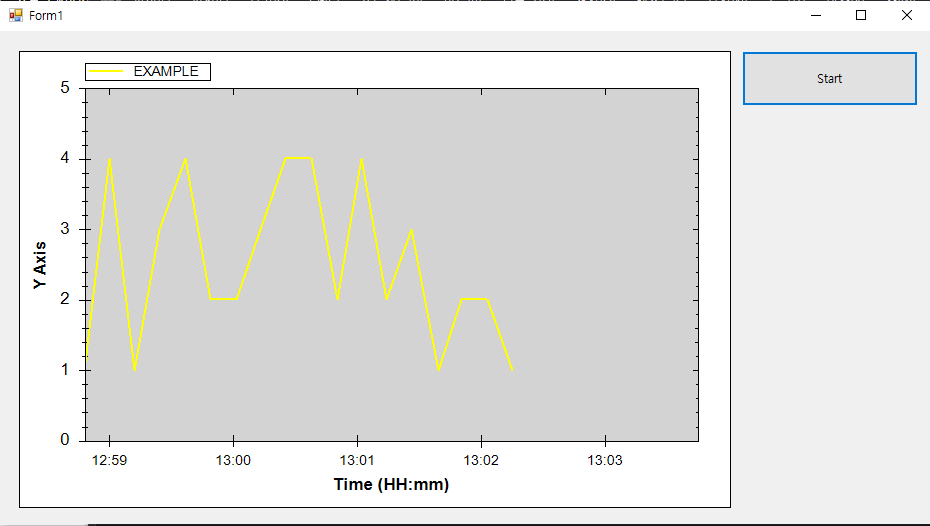
Timer를 이용하여 0.2초마다 새로운 데이터를 그리는 코드
namespace ZedGraph_Sample
{
    public partial class Form1 : Form
    {
        #region variable
        GraphPane mypane;
        LineItem exampleLineItem;
        PointPairList examplePointPairLitst;

        Random rand;

        #endregion

        public Form1()
        {
            InitializeComponent();
        }

        private void btnOpen_Click(object sender, EventArgs e)
        {
            timer1.Interval = 200; // 0.2s
            timer1.Start();
        }

        private void Form1_Load(object sender, EventArgs e)
        {
            mypane = new GraphPane();
            examplePointPairLitst = new PointPairList();
            rand = new Random();

            Init();
        }

        private void Init()
        {
            // zedGraphControl1 : winform 에서 사용하는 zedGraphControl 이름
            mypane = zedGraphControl1.GraphPane;
            // TItle 설정
            mypane.Title.Text = "EXAMPLE FOR ZEDGRAPH";
            mypane.Title.IsVisible = false;
            mypane.Title.FontSpec.Size = 15;
            mypane.Title.FontSpec.IsBold = true;

            //
            exampleLineItem = mypane.AddCurve("EXAMPLE", examplePointPairLitst, Color.Yellow, SymbolType.None);
            exampleLineItem.Line.Width = 2;
            exampleLineItem.Symbol.Fill = new Fill(Color.Black);

            // x축 설정
            mypane.XAxis.Type = AxisType.Linear;
            mypane.XAxis.Type = AxisType.Date;
            mypane.XAxis.Title.Text = "Time (HH:mm)";
            mypane.XAxis.Scale.Format = "mm:ss";
            mypane.XAxis.Scale.FontSpec.Size = 12;
            mypane.XAxis.Scale.MinorUnit = DateUnit.Second;
            mypane.XAxis.Scale.MinorStep = 1;


            mypane.Chart.Fill = new Fill(Color.LightGray);
            zedGraphControl1.AxisChange();
            zedGraphControl1.Invalidate();
        }


        public void SetData(DateTime x, int y)
        {
            examplePointPairLitst.Add(new XDate(x), y);

            DateTime StartDate = new XDate(examplePointPairLitst[0].X).DateTime;

            if ((x - StartDate).Seconds > 5)
            {
                mypane.XAxis.Scale.Min = new XDate(x.AddSeconds(-5));
                mypane.XAxis.Scale.Max = new XDate(x.AddSeconds(1.5));
            }
            else
            {
                mypane.XAxis.Scale.Min = new XDate(StartDate);
                mypane.XAxis.Scale.Max = new XDate(x.AddSeconds(1.5));
            }

            zedGraphControl1.AxisChange();
            zedGraphControl1.Invalidate();
            zedGraphControl1.Refresh();

        }

        private void timer1_Tick(object sender, EventArgs e)
        {
            DateTime now = DateTime.Now;
            int a = rand.Next(1, 5);

            SetData(now, a * 1);
        }
    }
}'프로그래밍 언어 > C#' 카테고리의 다른 글
| [C#] .dll 파일을 포함한 프로그램 빌드 (.exe 실행 파일 만들기) (0) | 2024.07.05 |
|---|---|
| [C#] 프로그램 빌드(.exe 파일 생성) (2) | 2024.07.05 |
| [C#] ZedGragh 패키지 설치하기(NuGet 패키지 설치, DLL 직접 참조) (0) | 2024.07.02 |
| [C#] StreamWriter 파일 쓰기 (텍스트 파일) (0) | 2024.07.01 |
| [C#] StreamReader 파일 읽기 (텍스트 파일) (0) | 2024.06.28 |


